HRLW Surface TOP and HRLW Seam Fill TOP
Replaces Nothing built in. Pair them with a GLSL TOP, Feedback TOP and Render Select TOP to paint or simulate in a mesh's UV space without visible seams.
Operator types
HrlwsurfaceandHrlwseamfill, labelsHRLW SurfaceandHRLW Seam Fill.
The problem they solve#
Textures painted, generated or simulated in UV space show seams: a UV layout cuts a surface into islands, and nothing in the texture knows that one island's edge continues on another's. The Surface TOP gives the texture that knowledge, and the Seam Fill TOP uses it. They are for reaction-diffusion, fire spreading, flows and anything that runs on a surface's UV texture.
HRLW Surface TOP#
Point POP at an HRLW Geometry POP (best: it is read straight from the GPU, so an animated mesh costs nothing on the CPU). Any other POP with UVs works too (UV Attribute, Tex by default, vertex or point), but it is downloaded through system memory and TouchDesigner stalls while it waits. A rest pose (Position Attribute, for example rest) needs that route.
Output: six 32-bit float colour buffers at Resolution. Pick a buffer with Render Select TOPs (Color Buffer Index):
| Buffer | RGB | A |
|---|---|---|
| 0 | position (the POP's space) | coverage: 1 on an island, 0.5 in the gutter, 0 elsewhere |
| 1 | normal | world size of a texel |
| 2 | tangent (along +u) | handedness of +v |
| 3 | seam links: u, v of the texel across the seam, rotation | link kind (what the Seam Fill TOP reads) |
| 4 | surface metric per texel step: E = |dP/dx|², F = dP/dx · dP/dy, G = |dP/dy|² | world area of a texel |
| 5 | primitive index (-1: none), barycentrics b1, b2 | triangle index |
| Parameter (default) | What it does |
|---|---|
| POP | The HRLW Geometry POP (or POP with UVs) |
UV Attribute (Tex), Position Attribute (P) |
|
| Resolution (1024 × 1024) | |
| Gutter (8 texels) | The texels around each island hold the surface as it continues across the seam |
| Weld Tolerance (0) | Merge points that are only nearly in the same place. Raise it if seams show up as open edges. |
| Center on Bounds (off), Position Scale (1,1,1), Position Offset (0) | Applies to buffer 0 only: (P - centre) * scale + offset. Scale 0.5, offset 0.5 on a mesh spanning -1..1 gives 0..1. |
| Rebuild Seams | Forces the CPU seam analysis |
The gutter position is the point on the neighbouring island, so anything computed from buffer 0 (3D noise, distance fields, gradients) is already seamless, without the Seam Fill TOP. Island borders with no neighbour clamp to the edge. Info CHOP: bounds_center_*, bounds_size_*, seam_edges, open_edges, coverage, texel_size_lo / texel_size_hi, layout_ms.
HRLW Seam Fill TOP#
Input 1 is any texture in the same UVs; input 2 is the Surface TOP's buffer 3 (via a Render Select TOP). It copies every gutter texel from across its seam (bilinear over the other island's own texels only) and leaves island texels untouched. Run it after every step of a simulation so each step's neighbour lookups read the real continuation of the surface.
| Parameter (default) | What it does |
|---|---|
| Vector Channels (None) | Mark RG and/or BA as vectors in texel space (velocities, directions): they are rotated or mirrored with the islands they cross into. |
| Outside the Gutter (Zero) | Zero clears texels beyond the gutter; Keep Input leaves them. |
Any 8, 16 or 32-bit Mono, RG or RGBA format works; use 32-bit float for simulations.
Walkthrough: reaction-diffusion on a surface (examples/reaction_diffusion.glsl)#
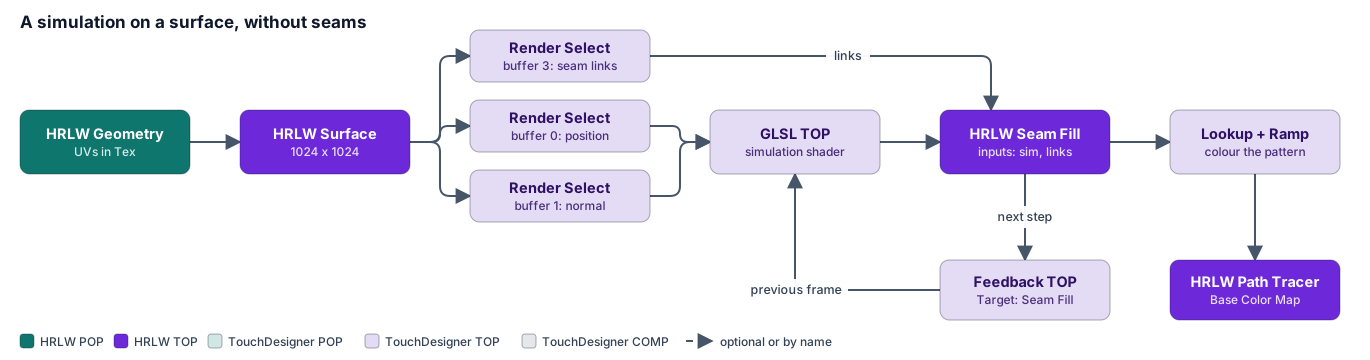
- HRLW Surface TOP
surface1: POP = your HRLW Geometry POP, Resolution 1024 × 1024. - Render Select TOPs
pos(surface1, buffer 0),nrm(buffer 1),links(buffer 3). - Constant TOP
init: colour (1, 0, 0, 1), 32-bit float RGBA, 1024 × 1024 (the starting state). - Feedback TOP
fb: inputinit, Target TOPfill1(set after step 6). - GLSL TOP
sim: inputsfb,pos,nrm; 32-bit float RGBA 1024 × 1024; pixel shader from the example file. Vectors page:uRates0.037 0.06 1 0.5,uSeedx y z radius,uSeedOn(1 for a frame to seed, then 0),uRefTexel= thetexel_size_lochannel of an Info CHOP onsurface1. - HRLW Seam Fill TOP
fill1: inputssimandlinks. - Colour it with a Lookup TOP and a Ramp TOP (the G channel is the pattern), into the Path Tracer's Base Color Map (or roughness, emission, displacement).
Pulse the Feedback TOP's Reset to start over. For more steps per frame, chain sim → fill1 → a second sim → a second Seam Fill.
Other example shaders#
| File | What it is |
|---|---|
examples/pt_adjacency.glsl |
GLSL functions that walk across texture space the way the surface continues, crossing seams through the links (ptWalk, ptSampleAt, ptWorldToTexel); no Seam Fill step needed. |
examples/surface_flow.glsl |
Dye carried around a mesh in a swirling flow, with only a feedback loop. |
examples/fire_spread.glsl |
Per-texel burn state for fire that creeps over a mesh; see the Volume Solver's Surface emission. |
examples/burn_look.glsl |
Turns a burn state into a charring base-colour map and a glowing emission map. |
examples/fire_volume.glsl, examples/volume_slice.glsl |
Test sources for a Volume TOP, and a slice viewer for a 3D texture. |
Limits#
- Islands need a margin from the texture's border: a UV sphere's u = 0 / u = 1 seam gets no gutter. Set the simulation GLSL TOP's input Extend to Repeat.
- Patterns change scale where islands have different texel densities unless the simulation compensates (the example's
uRefTexel). - Where three or more islands meet at a point, the gutter corner is an approximation.
- The gutter should be wider than the simulation's stencil and than the coarsest mip level you want clean (8 texels covers mips 0 to 3).