Docs / Getting started
Overview
| Operator | Family | What it does | Replaces or complements |
|---|---|---|---|
| HRLW Geometry | POP | Gathers geometry and materials for the path tracer; keeps wetness, burn and melt maps on surfaces | Geometry COMP (plus the MATs you would put on it) |
| HRLW Path Tracer | TOP | Renders the scene with OptiX, ReSTIR lighting and DLSS Ray Reconstruction denoising | Render TOP (reads your Camera and Light COMPs) |
| HRLW Liquid | POP | FLIP liquid, output as a surface mesh or particles | no built-in liquid solver |
| HRLW Whitewater | POP | Spray, foam and bubbles from a Liquid POP | no equivalent |
| HRLW Volume Solver | TOP | Smoke, fire and explosions on a 3D grid | GLSL TOP / Feedback TOP gas setups |
| HRLW Bodies | POP | Rigid bodies (spheres, boxes, capsules, meshes), joints, soft bodies, dents | Bullet Solver COMP with Actor COMPs |
| HRLW Fracture | POP | Cuts meshes into solid pieces (Voronoi) to feed Bodies | no equivalent |
| HRLW Surface | TOP | A POP's UV space as maps: position, normal, tangent, seam links | helps GLSL TOP and Render Select TOP workflows in UV space |
| HRLW Seam Fill | TOP | Stitches UV-space textures across UV seams | no equivalent |
Typical wiring
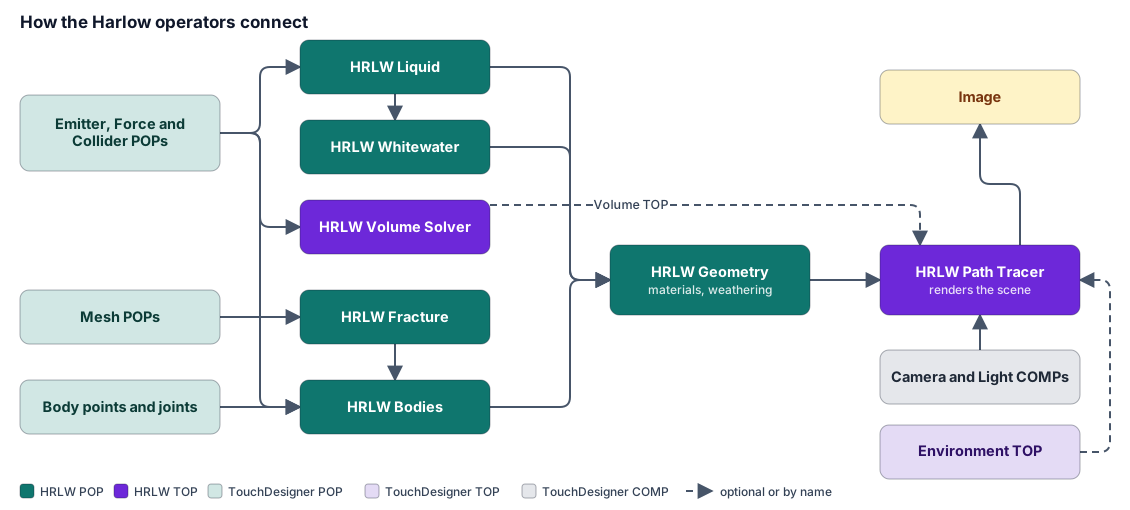
- Source geometry or a solver goes into an HRLW Geometry POP, which sets the material.
- A Camera COMP, Light COMPs and an Environment TOP sit near the HRLW Path Tracer TOP, which finds the HRLW Geometry POPs, Light COMPs and Camera COMP by name or pattern.
- Look at the TOP. Everything else is detail.
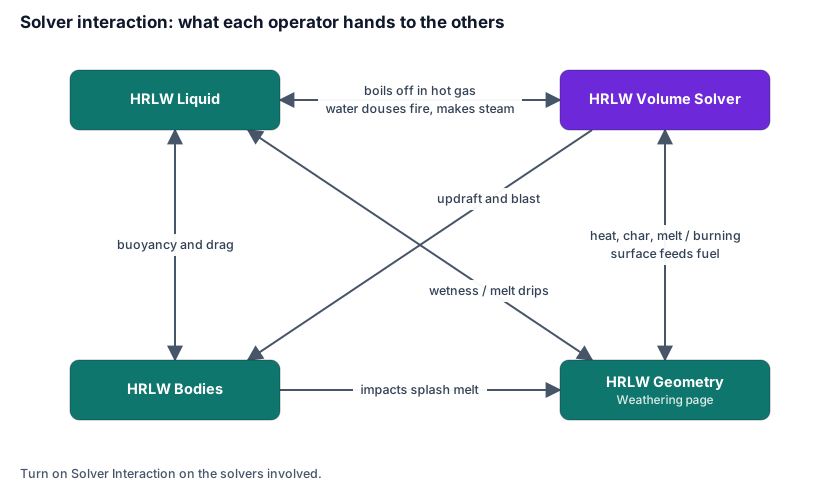
The solvers couple to each other without CPU round trips: a liquid can douse a fire, fire can char a surface that a liquid wets, a body can float in water and be pushed by an explosion. Those couplings are the Solver Interaction toggles and the Weathering page.